District heating portfolio optimization
In this tutorial, we will optimize the portfolio of a district heating supply system.
The tutorial is set up in three main steps:
Modeling the existing system delivering heat with a gas boiler
Adding a heat pump utilizing waste heat from datacenter and a thermal storage
Introducing a minimal load constraint to the heat production units
Each section contains a step by step explanation of how the district heating supply system is build using oemof.solph. Additionally, the repository contains a fully functional Python file of all three main steps for you to execute yourself or modify and play around with.
Step 1: Status-Quo system
As described above, we want to start by building the existing district heating supply systems, which in our simple example only contains a single gas boiler.
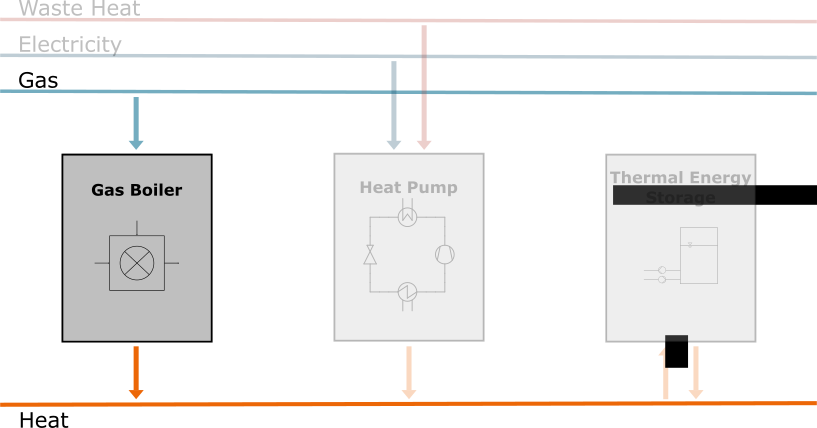
Fig. 1 Structure of the heating supplier’s portfolio
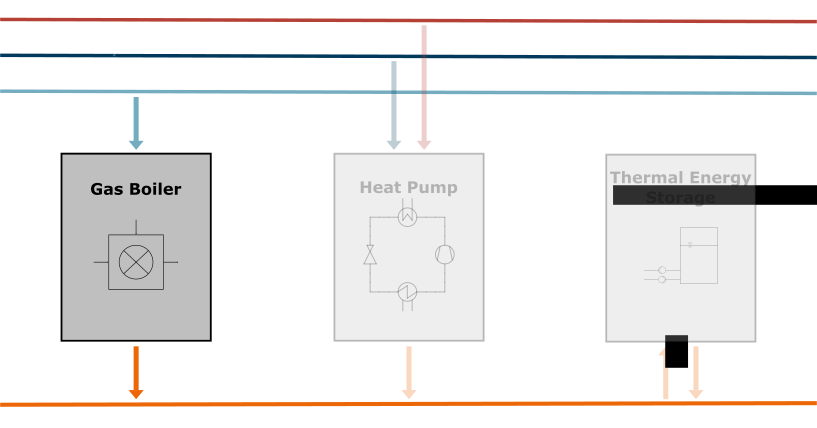
Fig. 2 Structure of the heating supplier’s portfolio
But before we start modeling the energy system, we should give some thought about what kind of input data we need for the simulation.Maybe the first that comes to mind is the heat demand our system should supply. As the demand varies throughout the seasons, it makes sense to simulate a full year. Typically, this is done with an hourly time resolution. Furthermore, we have to know the technical specifications of our gas boiler. This includes the existing capacity (i.e. the nominal heat output of the unit), its efficiency as well as variable cost arising with its operation. For simplicity and in good approximation of the real behavior of gas boilers, we make the assumption that the efficiency is constant. Finally, we need the price of the natural gas we burn inside the boiler. This could be a constant value if the price is contractually fixed or a time series of differing values if the gas is bought at an auction. For this tutorial, we assume the latter case.
To get started with our model, we first import the pandas package to read in a CSV file containing our time series input data. In this case, it includes the hourly heat demand and gas prices. The first column however contains the time index we make sure to be properly parsed. Generally, it is also recommended to use a parameter file (e.g. in the JSON format) for the constant input data, but in a small example like this, we opt to writing those values directly into the code.
import pandas as pd

data = pd.read_csv("input_data.csv", sep=";", index_col=0, parse_dates=True)
Now we can begin the modeling process of our district heating supply system. Every
oemof.solph model starts be creating (also called “initializing”) the EnergySystem.
To create an instance of the solph.EnergySystem class, we have to import the solph
package at first. To enforce our simulation time period and resolution, we set its
timeindex keyword argument to the index of the input DataFrame.
import oemof.solph as solph

district_heating_system = solph.EnergySystem(
    timeindex=data.index, infer_last_interval=False
)
After that, we need to set up the two energy carrying buses, i.e. the heat and gas
network. We make sure to set a label for the two to reference them later when we
analyze the results. After initialization, we add them to the district_heating_system
object.
heat_bus = solph.Bus(label="heat network")
gas_bus = solph.Bus(label="gas network")

district_heating_system.add(heat_bus, gas_bus)
Now we add a gas source for our boiler. We initialize a solph.components.Source
instance, give it a label and set the output to be the gas network, by setting it
to a dictionary with the gnw variable as key and the value to be a new solph.flows.Flow
instance. To define the cost for using the gas source, we set the variable_cost
keyword argument to the ‘gas price’ column of our input data time series.
Defining the heat sink works very similar, but we use a solph.components.Sink
and set its inputs argument instead. Also, we do not impose any costs
(even though we could set the variable_cost to a negative value to imply
a revenue). In order to enforce the heat demand to be covered at any point in time,
we use the fix argument. It takes a normalized time series that gets
multiplied with the nominal_capacity. Therefore, we set the latter to be
the maximum value of the time series and divide the whole time series by it when
setting the fix parameter.
Finally, both components get added to the energy system.
gas_source = solph.components.Source(
    label="gas source",
    outputs={gas_bus: solph.flows.Flow(variable_costs=data["gas price"])},
)

heat_sink = solph.components.Sink(
    label="heat sink",
    inputs={
        heat_bus: solph.flows.Flow(
            nominal_capacity=data["heat demand"].max(),
            fix=data["heat demand"] / data["heat demand"].max(),
        )
    },
)

district_heating_system.add(heat_sink, gas_source)
Last, but not least, we will depict the gas boiler itself, using a simple linear
model with the solph.components.Converter class. In contrast to the
components before, we have to define at least one input and one output, which in
case of the gas boiler is the natural gas burnt and the heat produced from it.
The connection from the gas network does not need any parametrization. We set the
nominal_capacity of the heat output to 20 MW (see note on units below) and
add variable_cost of 1.10 €/MWh. To depict energy losses due to thermodynamic
inefficiencies, we can set the conversion_factors keyword argument of
the solph.components.Converter. It expects a dictionary, with a key
corresponding to the bus to which the value (scalar or iterable) is applied. So,
to model a constant efficiency of 95 %, we set it to 0.95. Do not forget to add
the gas boiler to the district heating supply system.
gas_boiler = solph.components.Converter(
    label="gas boiler",
    inputs={gas_bus: solph.flows.Flow()},
    outputs={
        heat_bus: solph.flows.Flow(
            nominal_capacity=data["heat demand"].max(), variable_costs=1.10
        )
    },
    conversion_factors={gas_bus: 0.95},
)

district_heating_system.add(gas_boiler)
Note
Keep in mind that the units used in your energy system model are only implicit and that you have to check their consistency yourself.
FLOWCHART ENERGY SYSTEM
As our system is complete for this step, its time to start the unit commitment
optimization. For that, we first have to create a solph.Model instance
from our district_heating_system. Then we can use its solve() method
to run the optimization. We decide to use the open source solver
CBC and add the additional solve_kwargs
parameter 'tee' to True, in order to get a more verbose solver logging
output in the console.
model = solph.Model(district_heating_system)
model.solve(solver="cbc", solve_kwargs={"tee": True})
To receive the results, we pass the model into the results method
of the solph.processing submodule. We then use the node method of the
solph.views submodule to access the results of the two buses 'gas network'
and 'heat network'. Specifically, we need the optimized unit commitment time
series, so we access the 'sequences' key.
results = solph.processing.results(model)

data_gas_bus = solph.views.node(results, "gas network")["sequences"]
data_heat_bus = solph.views.node(results, "heat network")["sequences"]
Now, let’s have a look at those results. We will create a simple bar plot of
the gas boilers unit commitment. To achieve this, we have to import a plotting
library like matplotlib. We use its subplots method to create a figure
fig and an axes ax and set the plots size to be ten by six inches.
Then, we pass the index of data_heat_bus and the column containing the gas
boiler’s heat production into the axes bar method.
Note
In oemof.solph, indexing works by passing a tuple containing two items:
at first, another tuple containing the string labels of the two nodes of
interest and second, the the oemof.solph variable name to be extracted.
In case of the example below, we are looking for the 'flow' between the
'gas boiler' and 'heat network' nodes.
Finally, we set a label to the bars to be plotted that corresponds to the
unit’s name. This is mostly anticipatory, as we will want to decern between
different heat production units later in this tutorial. To improve the plots
appearance, we add a legend in the upper right corner, grid lines along the
horizontal axis and a fitting label for the same. Feel free to change the look
of the plot to your heart’s content. The final step to see the optimization
results is calling the show method.
import matplotlib.pyplot as plt

# plt.style.use('dark_background')

fig, ax = plt.subplots(figsize=[10, 6])

ax.bar(
    data_heat_bus.index,
    data_heat_bus[(("gas boiler", "heat network"), "flow")],
    label="gas boiler",
    color="#EC6707",
)

ax.legend(loc="upper right")
ax.grid(axis="y")
ax.set_ylabel("Hourly heat production in MWh")

# plt.tight_layout()
# plt.savefig('intro_tut_dhs_1_hourly_heat_production.svg')
plt.show()
Your plot should look similar to this:
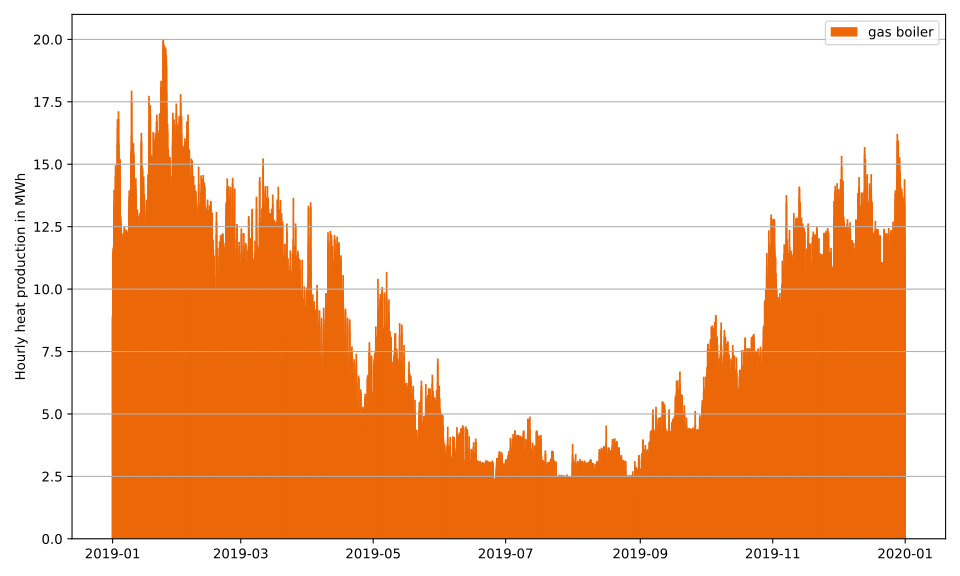
Fig. 3 System dispatch of heating system with gas boiler
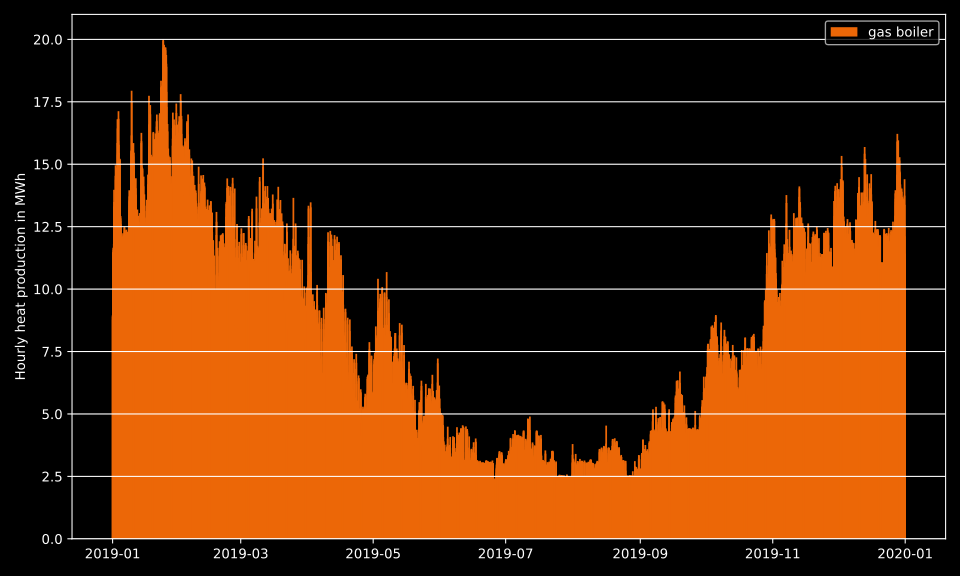
Fig. 4 System dispatch of heating system with gas boiler
Let’s continue by assessing the economic merit of our district heating supply system. A common indicator for that purpose are the Levelized Cost of Heat (\(LCOH\)). As shown in equation (1), they account for the upfront invest cost \(C_\text{invest}\) necessary to build the heat production units as well as the cost evoked via their operation \(C_\text{operation}\) over the unit’s assumed lifetime \(n\). These cost get reduced by any additional revenues \(R\) generated besides its heat production. The total cash flow balance is then devided by the total heat produced \(Q_\text{total}\). In order to make one-off investments comparable with the other periodically occuring values, the latter are multiplied with the Present Value Factor (\(PVF\), see equation (2)). This yields the total cost necessary to produce one unit of heat by the heat supply system (not accounting for any additional cost for e.g. the pipe network, etc.).
As we will evaluate the \(LCOH\) again later, let’s define a function to calculate it from the input values using sensible default values as depicted below.
def LCOH(invest_cost, operation_cost, heat_produced, revenue=0, i=0.05, n=20):
    pvf = ((1 + i) ** n - 1) / ((1 + i) ** n * i)

    return (invest_cost + pvf * (operation_cost - revenue)) / (
        pvf * heat_produced
    )
Now we’ll begin computing the \(LCOH\). First of all, we need some cost data of a typical gas boiler. We assume specific invest cost of 50,000.00 €/MW, a nominal rated capacity of 20 MW and variable operation cost of 1.10 €/MWh. The invest cost can be calculate by multiplying the specific cost and capacity. For all cost related to the gas boiler’s operation, we multiply the variable cost with the total heat produced by the unit and add it to the sum of the hourly cost evoked by the purchase of natural gas. Finllay, we sum up the heat supplied to the heat sink and use the calculated values to compute the \(LCOH\), which are printed to the console with a value of 18.84 €/MWh.
spec_inv_gas_boiler = 50000
cap_gas_boiler = 20
var_cost_gas_boiler = 1.10

invest_cost = spec_inv_gas_boiler * cap_gas_boiler
operation_cost = (
    var_cost_gas_boiler
    * data_heat_bus[(("gas boiler", "heat network"), "flow")].sum()
    + (
        data["gas price"]
        * data_gas_bus[(("gas network", "gas boiler"), "flow")]
    ).sum()
)
heat_produced = data_heat_bus[(("heat network", "heat sink"), "flow")].sum()

lcoh = LCOH(invest_cost, operation_cost, heat_produced)
print(f"LCOH: {lcoh:.2f} €/MWh")
This completes the first step of the District Heating Tutorial. Take a look at the following lessons and think about what you should take away with you for now.
Learnings
After the first step of this tutorial you should be able to do the following:
Read data from csv-files
Initialize an energy system
Create simple components
Optimize the dispatch of a district heating system
Visualize results and compute key parameters
Step 2: Plan capacity of heat pump and heat storage
In addition to the gas boiler, in the second step of the tutorial, we want to consider adding a heat pump as well as a thermal energy storage to our district heating system.
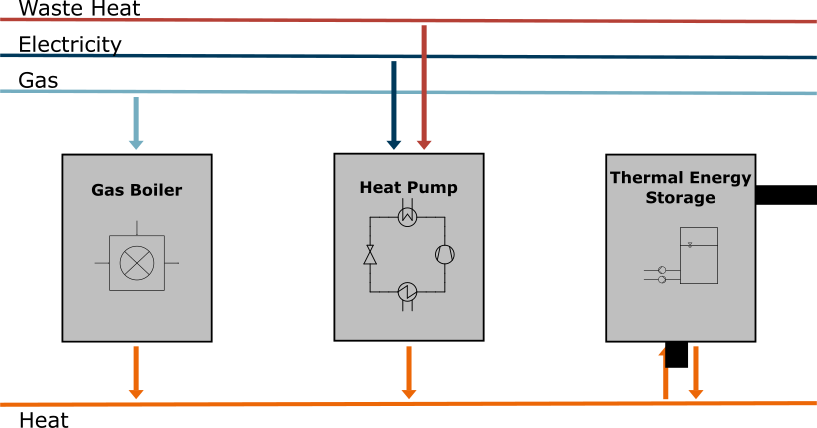
Fig. 5 Structure of the heating supplier’s portfolio
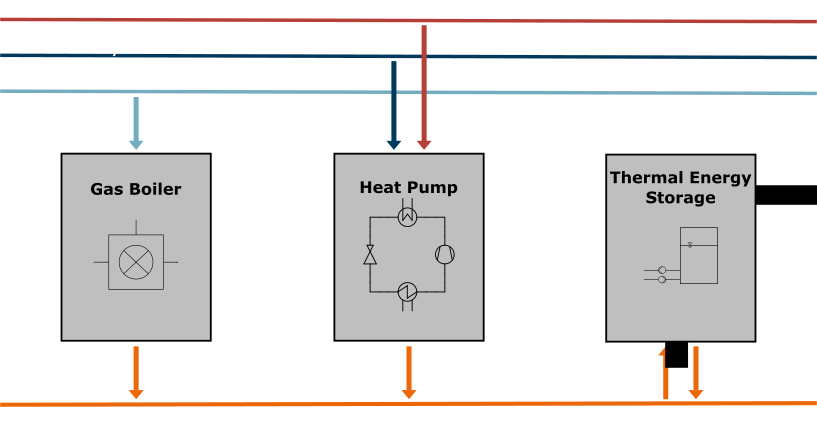
Fig. 6 Structure of the heating supplier’s portfolio
As we don’t want to predefine their respective sizes, but rather build them according to what makes the most sense economically, we will employ a combined design and dispatch optimization. To make it a fair comparison, the gas boiler’s size will also be optimized, as opposed to our approach in the previous step.
Note
For clarity, we’ll only show code that is new or changing, but each example step will contain a fully functional model.
First of all, we have to think about what new information we need for adding a heat pump and storage. Besides technical specifications of the two units we also have to know the price of electricity our heat pump will use to produce heat. As we won’t model any constraints for its heat source yet, the electricity price data is the only new entry in our time series input data.
data = pd.read_csv("input_data.csv", sep=";", index_col=0, parse_dates=True)
As new energy carriers will be used in our energy system, we need to add corresponding buses to it. So let’s add an electricity and a waste heat bus.
waste_heat_bus = solph.Bus(label="waste heat network")
electricity_bus = solph.Bus(label="electricity network")

district_heating_system.add(waste_heat_bus, electricity_bus)
Using the buses above, we can now add two sources accordingly by connecting
their respective outputs to them via solph.flows.Flow instances.
Secondly, we make sure to add the ‘el_spot_price’ time series as variable
cost of the flow.
# ist die waste heat source fix oder unendlich?
waste_heat_source = solph.components.Source(
    label="waste heat source", outputs={waste_heat_bus: solph.flows.Flow()}
)

electricity_source = solph.components.Source(
    label="electricity source",
    outputs={
        electricity_bus: solph.flows.Flow(variable_costs=data["el_spot_price"])
    },
)

district_heating_system.add(waste_heat_source, electricity_source)
Finally, let’s add the waste heat heat pump to the energy system. Before
creating the solph.components.Converter instance, we’ll define some
specifications like the heat pump’s \(COP\) as well as specific invest and
variable operation costs, which we can use again later for the economic
evaluation. We then add to flows from the electricity and waste heat buses to
the inputs and the heat bus to the outputs dictionary. As we decided not to
predefine the heat pump’s nominal capacity, we can’t set it to a numerical
value, but rather pass an instance of the solph.Investment class.
It can take upper and lower bounds as well as other arguments, but we only set
the so called ‘equivalent periodical cost’ to the ep_cost parameter.
Before diving deeper into those cost, let’s finish the initialization of the
heat pump by defining the conversion_factors between the output and
the two inputs.
cop = 3.5
spec_inv_heat_pump = 500000
var_cost_heat_pump = 1.2

heat_pump = solph.components.Converter(
    label="heat pump",
    inputs={
        electricity_bus: solph.flows.Flow(),
        waste_heat_bus: solph.flows.Flow(),
    },
    outputs={
        heat_bus: solph.flows.Flow(
            nominal_capacity=solph.Investment(
                ep_costs=epc(spec_inv_heat_pump)
            ),
            variable_costs=1.2,
        )
    },
    conversion_factors={
        electricity_bus: 1 / cop,
        waste_heat_bus: (cop - 1) / cop,
    },
)
district_heating_system.add(heat_pump)
To derive the correct relations between the respective inputs and the produced
heat flow, we have to take a look at the definition of the \(COP\).
Equation (3) describes it according to both the power and the heat
input. These terms can then be rearranged to calculate the ratios between all
flows, which are finally passed into the values of the
conversion_factors dictionary to the bus keys.
As mentioned above, specific investment cost aren’t directly passed to the
ep_cost argument, as they are typically allocated over the units
lifetime. Furthermore, capital cost in the form of interest have to be
considered. This is done by multiplying the specific investment cost
\(c_\text{invest}\) by the annuity factor \(AF\) (see equation
(4)), which itself is the reciprocal of the \(PVF\) introduced
earlier (see equation (5)).
The calculation of the specific equivalent periodical cost \(c_\text{ep}\)
are again implemented via a python function, which will be organized together
with the \(LCOH\) function in the helpers.py utility file.
def epc(invest_cost, i=0.05, n=20):
    af = (i * (1 + i) ** n) / ((1 + i) ** n - 1)

    return invest_cost * af
Tip
It often makes sense to organize code in different logically coherent
utility files. Just make sure to import the functions you want to use from
now on like this: from helpers import LCOH, epc
This concludes the addition of the heat pump and we can continue by adding the
thermal energy storage. Again, we are considering specific invest cost as well
as operational cost while charging and discharging the storage. Besides that,
the solph.components.GenericStorage class takes some additional
arguments we will supply. Besides defining the in- and output with an empty
flow, we pass the constant relation between their nominal flows and the
storage’s capacity to be optimized. The value of 1/24 is chosen so that the TES
can be fully charged from an empty content within one day. Furthermore, we set
the balanced parameter True in order to force the optimizer to
recharge the TES back to its inital storage content at the end of the period.
Last of all, we define a constant relative loss factor of 0.001 per timestep or
1/10 % per hour.
spec_inv_storage = 1060
var_cost_storage = 0.1

heat_storage = solph.components.GenericStorage(
    label="heat storage",
    nominal_capacity=solph.Investment(ep_costs=epc(spec_inv_storage)),
    inputs={
        heat_bus: solph.flows.Flow(
            variable_costs=var_cost_storage,
            nominal_capacity=solph.Investment(),
        )
    },
    outputs={
        heat_bus: solph.flows.Flow(
            variable_costs=var_cost_storage,
            nominal_capacity=solph.Investment(),
        )
    },
    invest_relation_input_capacity=1 / 24,
    invest_relation_output_capacity=1 / 24,
    balanced=True,
    loss_rate=0.001,
)

district_heating_system.add(heat_storage)
Now we can finally run the model and extract the optimization results again. In addition to the data in the previous step, we also pull out data for the electricity bus as well as the optimized capacities of our heat production units. The latter are also displayed in Table 1.
data_el_bus = solph.views.node(results, "electricity network")["sequences"]
data_caps = solph.views.node(results, "heat network")["scalars"]

cap_gas_boiler = data_caps[("gas boiler", "heat network"), "invest"]
cap_heat_pump = data_caps[("heat pump", "heat network"), "invest"]
cap_storage = solph.views.node(results, "heat storage")["scalars"][
    (("heat storage", "None"), "invest")
]
cap_storage_out = data_caps[("heat storage", "heat network"), "invest"]

print(f"capacity gas boiler: {cap_gas_boiler:.1f} MW")
print(f"capacity heat pump: {cap_heat_pump:.1f} MW")
print(f"capacity heat storage: {cap_storage:.1f} MWh")
print(f"capacity heat storage (out): {cap_storage_out:.1f} MW")
gas boiler |
heat pump |
heat storage |
|
|---|---|---|---|
capacity |
10.2 MW |
6.0 MW |
98.6 MWh |
The results show that the gas boilers capacities is halfed, yet it stays the biggest heat production unit, with the heat pump being about 60% of the boiler’s size. Interestingly, the heat production units are not large enough to supply the peak load on their own, but rather rely on the storage to support them in the few hours of the year where it is necessary. The TES itself is sized to store about 10 hours of full load production of the gas boiler. To investigate how the units are actually dispatched, let’s plot the hourly heat production again. Furthermore, we can plot the heat storages hourly content to help our understanding of the district heating system.
unit_colors = {
    "gas boiler": "#EC6707",
    "heat pump": "#B54036",
    "heat storage (discharge)": "#BFBFBF",
    "heat storage (charge)": "#696969",
}

fig, ax = plt.subplots(figsize=[10, 6])

bottom = 0
for unit in ["heat pump", "gas boiler", "heat storage"]:
    unit_label = f"{unit} (discharge)" if "storage" in unit else unit
    ax.bar(
        data_heat_bus.index,
        data_heat_bus[((unit, "heat network"), "flow")],
        label=unit_label,
        color=unit_colors[unit_label],
        bottom=bottom,
    )
    bottom += data_heat_bus[((unit, "heat network"), "flow")]

unit_label = "heat storage (charge)"
ax.bar(
    data_heat_bus.index,
    -1 * data_heat_bus[(("heat network", "heat storage"), "flow")],
    label=unit_label,
    color=unit_colors[unit_label],
)

ax.legend(loc="upper center", ncol=2)
ax.grid(axis="y")
ax.set_ylabel("Hourly heat production in MWh")

# plt.tight_layout()
# plt.savefig('intro_tut_dhs_2_hourly_heat_production.svg')


fig, ax = plt.subplots(figsize=[10, 6])

data_heat_storage = solph.views.node(results, "heat storage")["sequences"]

ax.plot(
    data_heat_storage[(("heat storage", "None"), "storage_content")],
    color="#00395B",
)

ax.grid(axis="y")
ax.set_ylabel("Hourly heat storage content in MWh")

# plt.tight_layout()
# plt.savefig('intro_tut_dhs_2_hourly_storage_content.svg')

plt.show()
Below you can see the two plots created from the code snippet above. We can see that the heat pump is used to deliver the base load most of the time throughout the year. During the heating period the gas boiler is dispatched together with the heat pump to cover the middle load. As suspected from the optimized capacities, the heat storage then joins the other two units to supply the peak load. It is also employed to cover the summer demand when it falls below the nominal capacity of the heat pump, which is used in tandem with the storage to avoid part load operation.
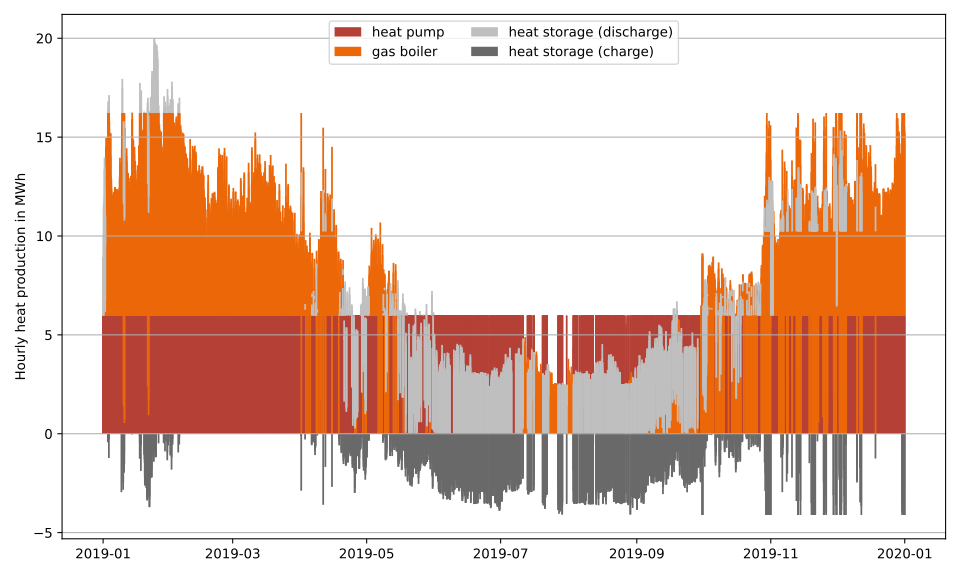
Fig. 7 System dispatch of heating system with gas boiler, heat pump and storage
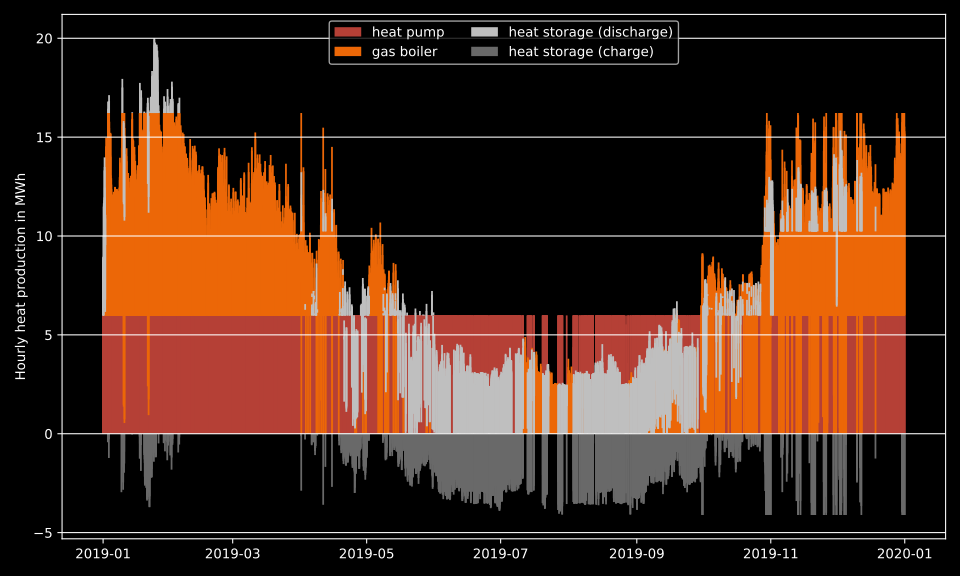
Fig. 8 System dispatch of heating system with gas boiler, heat pump and storage
The hourly storage content plot reinforces our assumptions about its usage within the district heating system. It is filled for peak load early in the year, then empty for a while until the summer demand makes it desirable again. This holds true for almost the rest of the year until it phases out again, with the exception of a peak load case in december.
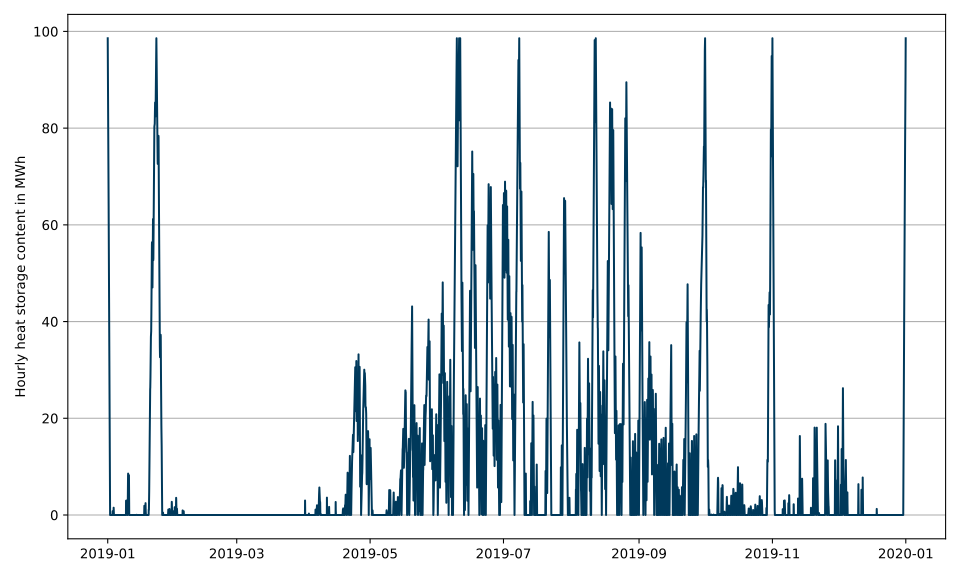
Fig. 9 Storage content over the operating period
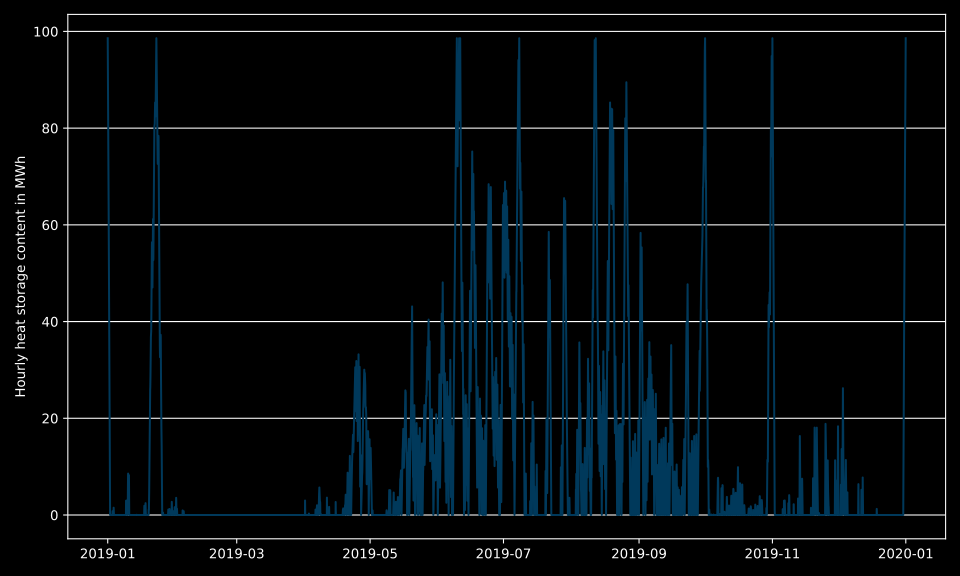
Fig. 10 Storage content over the operating period
Let’s conclude our result analysis by recalculating the \(LCOH\) of the
newly designed system. The computation works analogous to the one before, but
with additional investment and operational cost of the new heat production
units. Make sure to correctly import the LCOH function, if you moved it to
the helpers.py file like we did.
invest_cost = (
    spec_inv_gas_boiler * cap_gas_boiler
    + spec_inv_heat_pump * cap_heat_pump
    + spec_inv_storage * cap_storage
)
operation_cost = (
    var_cost_gas_boiler
    * data_heat_bus[(("gas boiler", "heat network"), "flow")].sum()
    + (
        data["gas price"]
        * data_gas_bus[(("gas network", "gas boiler"), "flow")]
    ).sum()
    + var_cost_heat_pump
    * data_heat_bus[(("heat pump", "heat network"), "flow")].sum()
    + (
        data["el_spot_price"]
        * data_el_bus[(("electricity network", "heat pump"), "flow")]
    ).sum()
    + var_cost_storage
    * data_heat_bus[(("heat storage", "heat network"), "flow")].sum()
    + var_cost_storage
    * data_heat_bus[(("heat network", "heat storage"), "flow")].sum()
)
heat_produced = data_heat_bus[(("heat network", "heat sink"), "flow")].sum()

lcoh = LCOH(invest_cost, operation_cost, heat_produced)
print(f"LCOH: {lcoh:.2f} €/MWh")
The calculation yields a \(LCOH\) of 18.61 €/MWh, which is slightly cheaper then the one we got from only using the gas boiler in the step before. We ommited any ecological analysis or emission calculation to keep the tutorial concise, but it is self-evident that reducing gas boiler heat covarage in favor of Power-to-Heat technologies has environmental benefits as well.
Learnings
After the second step of this tutorial you should be able to do the following:
Expand the district heating system
Create first complex components
Use functions for recurring tasks
Optimize the design and dispatch of district heating system
Step 3: Introduce constraints to the heat production units
To round off this tutorial, let’s add some more realistic constraints to our heat pump. We will begin by enforcing a relative minimum part load and finish by constraining the waste heat source.
To implement the minimum part load constraint we have to change the definition
of our heat pump converter. The minimum keyword takes a relative
minimum part load that is multiplied with the nominal capacity or invest
variable to form a lower bound of the flow. Passing 0.5 results in a
minimum heat production of 50% its nominal value. If we only set this argument,
the heat pump would always have to produce at least this amount of heat. As we
also want to allow it to be switched off, we have to use a mixed integer linear
formulation, instead of the purely linear one we used until now. That is
achieved by setting the nonconvex argument to an instance of the
solph.NonConvex class. This powerful object also allows for setting
minimum and maximum up- or downtimes and startups as well as gradient limits.
A side effect of setting the nonconvex parameter is, that we also
have to pass an upper limit to the solph.Investment instance via
the maximum parameter. To not interfere with the free optimization
of the nominal capacity, we can set it to an amount that is arbitrarily larger
than the peak load, so we decide on 999 MW.
heat_pump = solph.components.Converter(
    label="heat pump",
    inputs={
        electricity_bus: solph.flows.Flow(),
        waste_heat_bus: solph.flows.Flow(),
    },
    outputs={
        heat_bus: solph.flows.Flow(
            nominal_capacity=solph.Investment(
                ep_costs=epc(spec_inv_heat_pump), maximum=999
            ),
            variable_costs=1.2,
            minimum=0.5,
            nonconvex=solph.NonConvex(),
        )
    },
    conversion_factors={
        electricity_bus: 1 / cop,
        waste_heat_bus: (cop - 1) / cop,
    },
)
district_heating_system.add(heat_pump)
Tip
What if minimum demand cannot be supplied?
Add a slack source for the heat demand
Add a thermal energy store or change parameters of the existing storage
Add a new heat production unit
As these changes introduce mixed integer linear formulations, the CBC solver is
taking longer to solve the optimization problem and may not reach optimality in
a feasable time frame. We can reach a solution that is good enough for our
standards by introducing the concept of an optimality tolerance or MIP Gap. It
describes a relative tolerance to a known optimal objective value from a
solution, that is small enough to tolerate to us. For example, we can decide
that a solution that is within 1% of the optimum is precise enough for us that
we don’t need the solver to potentially run for hours longer to reach it. Each
solver has its own parameter to control this behavior. Using CBC, we can set
the 'ratio' key of the cmdline_options parameter to the desired
tolerance. As this will likely lead to an early termination short of optimality
(as is also intended), we have to set the allow_nonoptimal flag to
True in order to avoid raising an exception.
# solve model
model = solph.Model(district_heating_system)
model.solve(
    solver="cbc",
    solve_kwargs={"tee": True},
    cmdline_options={"ratio": 0.01},
    allow_nonoptimal=True,
)
We extract the optimized unit capacities just as we did before. Table 2 contains those results, which are not too far off from the previous solution without the minimum part load constraint. This shouldn’t be too confusing, as the heat pump hasn’t been operated in part load very often before.
gas boiler |
heat pump |
heat storage |
|
|---|---|---|---|
capacity |
10.6 MW |
5.7 MW |
91.1 MWh |
Note
Especially when introducing an optimality tolerance, but also in the case of flat optima, different solutions to the same optimization problem can result in similar objective values. Keep that in mind when comparing your results with ours and in future analyses.
To check for any significant changes of the hourly unit dispatch, let’s create the plots from before again. They don’t need any adaptation, so we don’t show the code again.
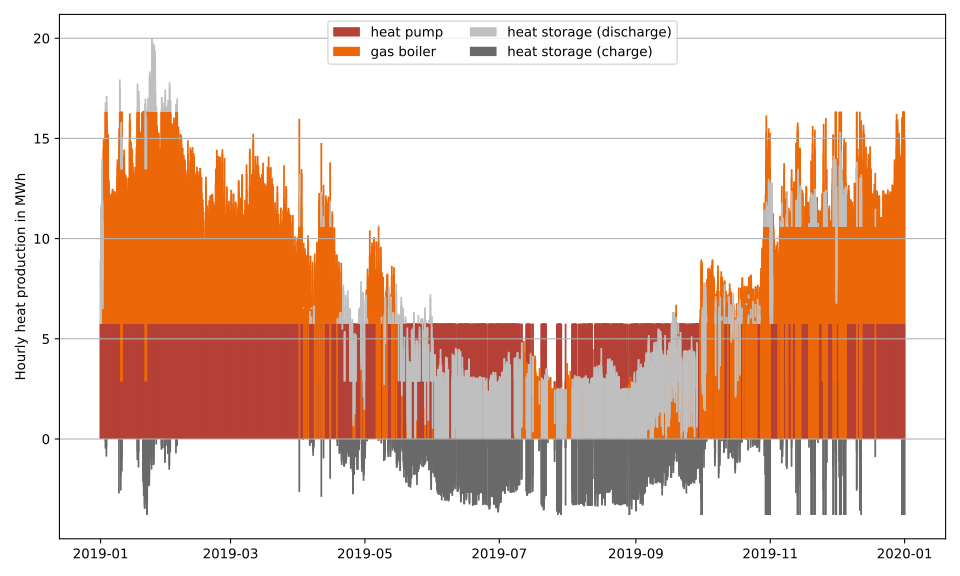
Fig. 11 System dispatch of heating system with minimum part load of heat pump
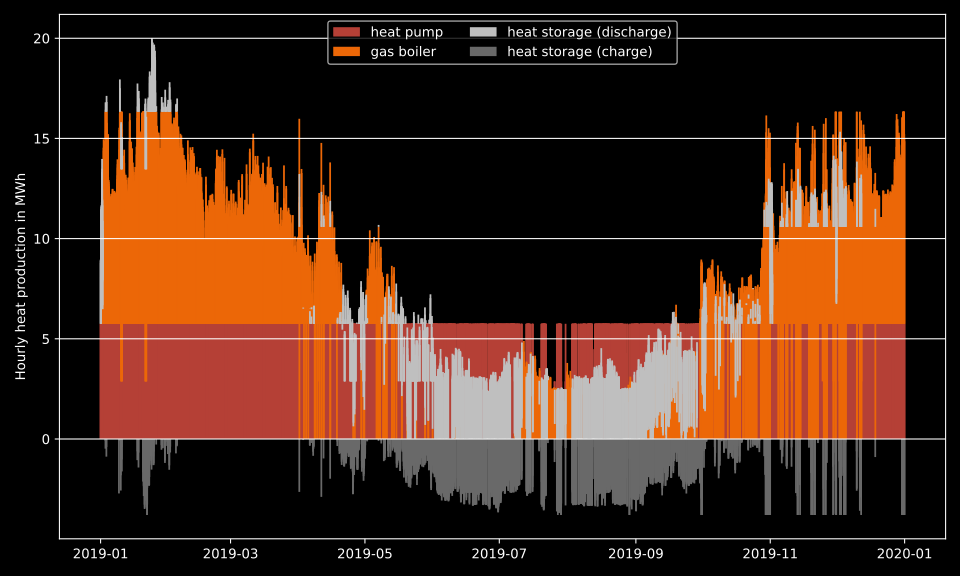
Fig. 12 System dispatch of heating system with minimum part load of heat pump
We can visually confirm the enforcement of minimum part load by observing the valleys of the heat pump heat production. While those reach deeper in the previous plot, this time we can see them being half the height of full load operation, which is exactly what we imposed. As to be expected from the similar size of capacities, we don’t see any major differences in the unit dispatch.
For the sake of completeness, we’ll have a look at the storage content as well. It shows even fewer obvious dissimilarities to the previous plot.
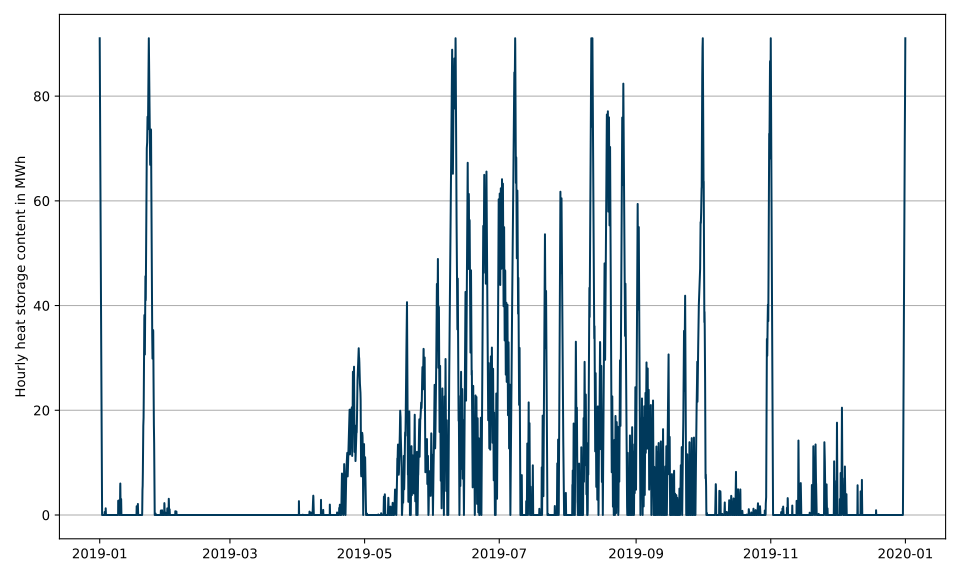
Fig. 13 Storage content over the operating period with minimum part load of heat pump
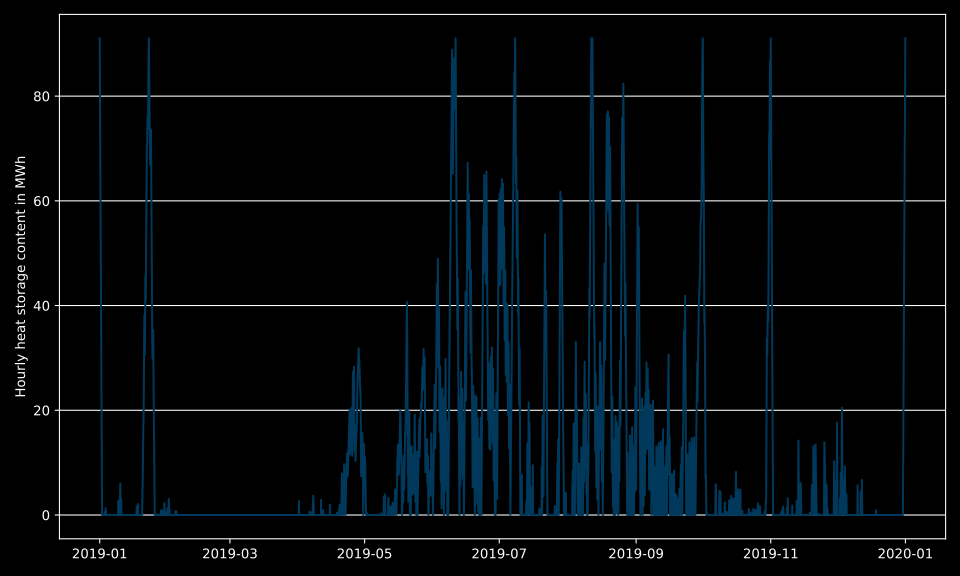
Fig. 14 Storage content over the operating period with minimum part load of heat pump
As the \(LCOH\) comes out only a few cents higher than before, we also don’t spend too much time on economical analysis. Rather, let’s have a look at the last constraint we want to add to our district heating system model. Up until now, we didn’t impose any restriction on the amount of wast heat we could obtain from the source. In reality, often this isn’t the case at all. If the heat comes from an industrial process, it likely runs as much as possible and oftentimes produces a constant rate of excess heat. Depending on agreements or contracts between the waste heat supplier and the district heating system operator, using the waste heat at any time could be obligated.
For our last example, let’s say this is the case. We decide that a constant
2.5 MW of excess heat is produced at all times throughout the year.
Furthermore, we agree to use it in our district heating system every time as
well. We can model this behavior by adding the fix parameter to the
definition of the waste heat source and passing the amount to it.
fix can also take a time series of values and is multiplied with the
nominal_capacity elementwise to compute the amount supplied to the
energy system in all time intervals. In this example, we’ll do without
considering any cost for the usage of waste heat, but feel free play around
with that on your own.
waste_heat_source = solph.components.Source(
    label="waste heat source",
    outputs={waste_heat_bus: solph.flows.Flow(nominal_capacity=1, fix=2.5)},
)

district_heating_system.add(waste_heat_source)
As this is the only change we’ll perform, we can have a look at the results again. Table 3 shows the capacities, with the gas boiler coming out slightly larger again. The heat pump is excatly 3.5 MW, which you can ponder for a moment to why this occured. In contrast to the previous examples, the heat storage is much larger and can work as more than just a daily buffer.
gas boiler |
heat pump |
heat storage |
|
|---|---|---|---|
capacity |
10.9 MW |
3.5 MW |
542.8 MWh |
To possibly confirm a suspicion of yours about how the size of the heat pump came about, let’s have a look at the unit commitment in the figure below. We can see that the heat pump is always running at full capacity. This results from the new constraint we subjected the waste heat source to. The biggest other difference is the extended usage of the heat storage, which has to pick up excess heat production of the heat pump during the low summer load. This is also seen in the storage content plot below the unit commitment figure. Beyond that, we see peaks of usage during the heating period.
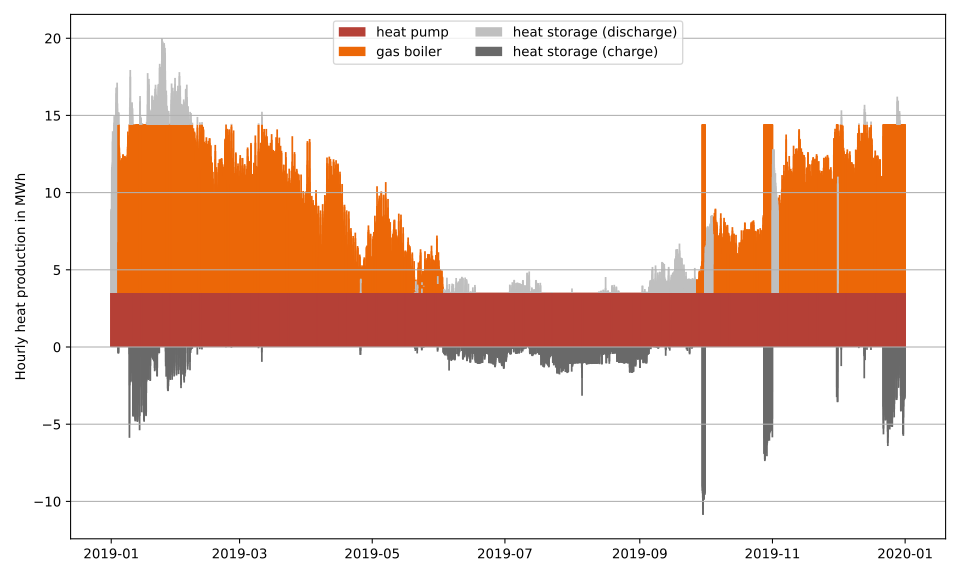
Fig. 15 System dispatch of heating system with fixed waste heat source
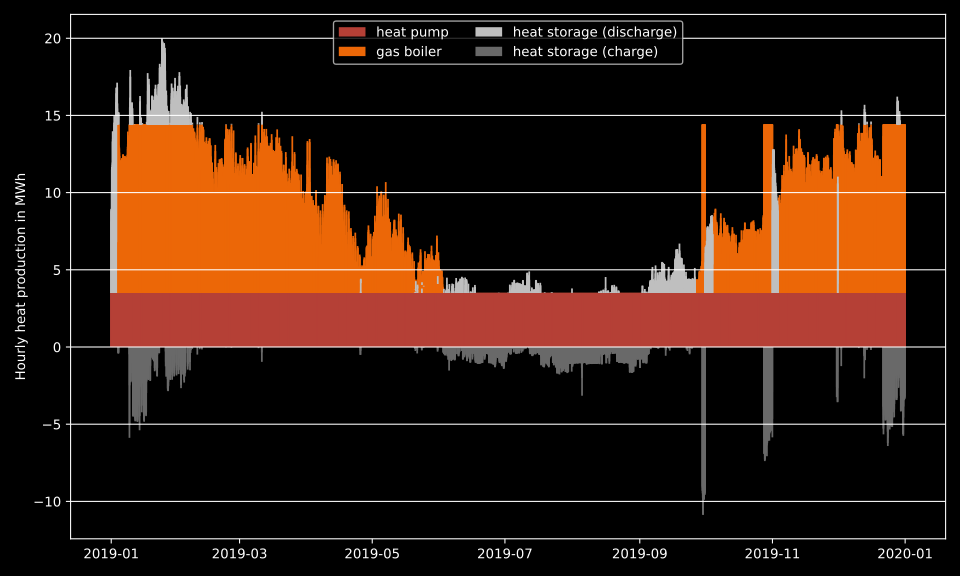
Fig. 16 System dispatch of heating system with fixed waste heat source
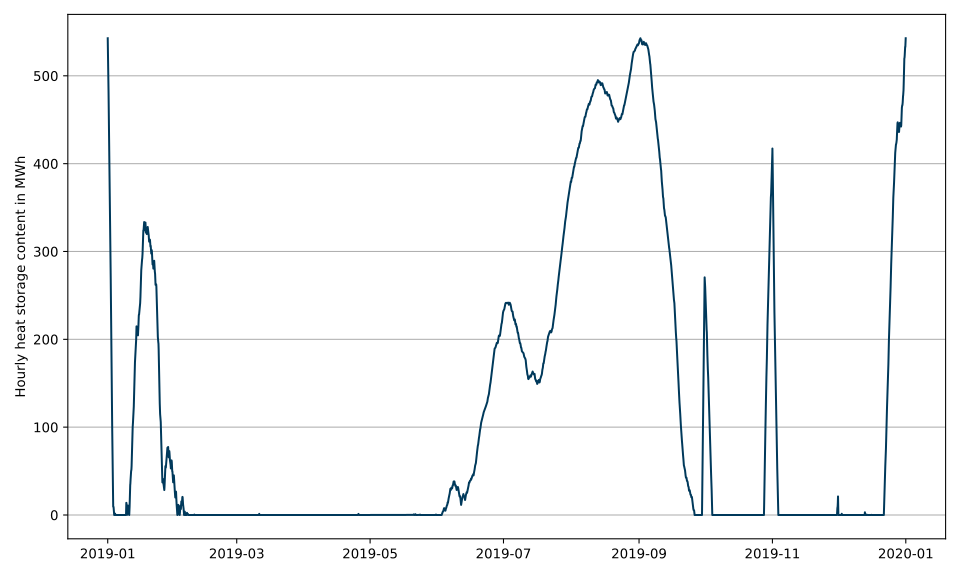
Fig. 17 Storage content over the operating period with fixed waste heat source
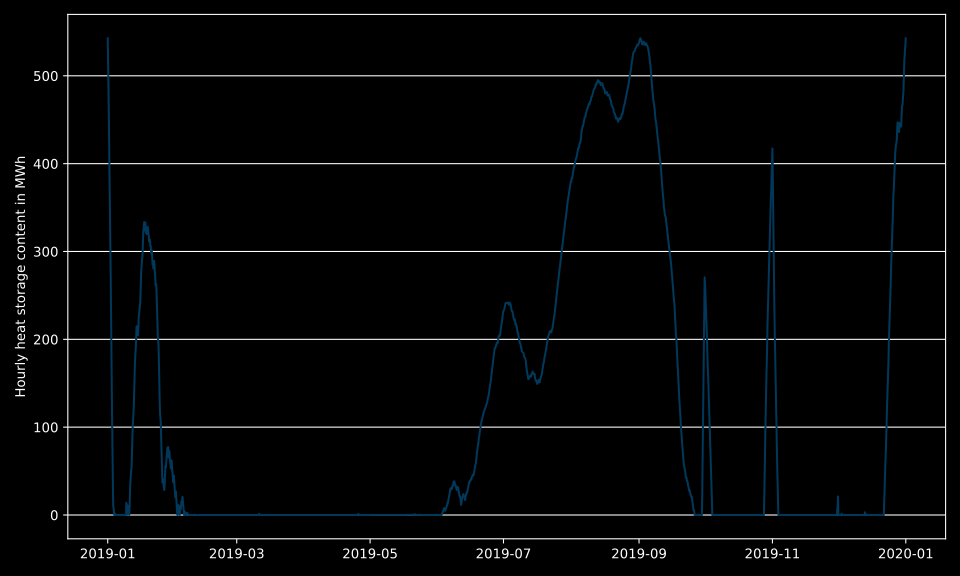
Fig. 18 Storage content over the operating period with fixed waste heat source
Learnings
After the third step of this tutorial you should be able to do the following:
Add or change key word arguments to add constraints to heat production units
Understand the functionality of minimum load constraints as well as the impact of fixed and variable sources
Understand the implications of adding mixed integer linear constraints compared to purely linear problems
Deal with theoretically unsolvable optimization problems