Energy System
In most cases an EnergySystem instance is defined when we start to build up an energy system model. The EnergySystem instance will contain the model’s elements and a time index.
An example of a simple energy system shows the usage of the nodes for real world representations:
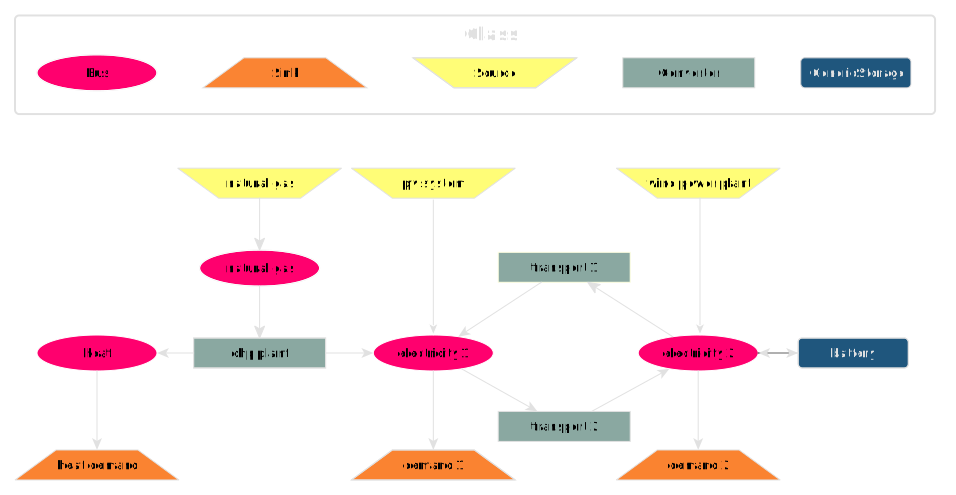
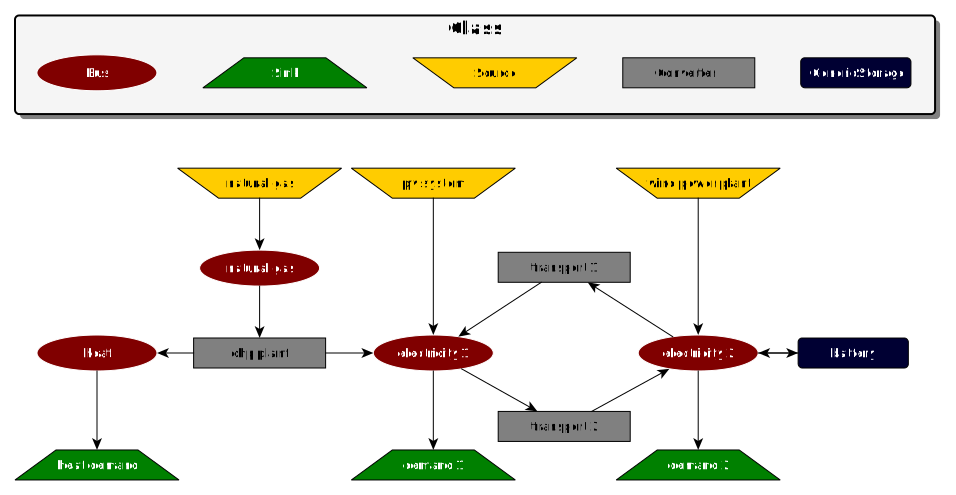
The figure shows a simple energy system using the four basic component classes and the Bus class. If you remove the transmission line (transport 1 and transport 2) you get two systems but they still represent one energy system which will be optimised at once.
In general, the EnergySystem is a mathematical graph of edges and nodes, represented by three main elements in oemof.solph:
Edges: Flows
Nodes: Buses and Components
Flows
Flows are used to create connections between different elements of your
EnergySystem. You can connect Components with Buses or Buses with other
Buses. The Flow class is normally used in combination with the
definition of a component. It connects the inlets and/or outlets of a component.
to the respective Buses.
On top of creating the topological structure of your EnergySystem, the Flow
holds variables, which optimized with the solver. This can be the per time step
amounts of energy transferred from one part of your system to another one, or
the installed capacity of a specific component (e.g. a heat pump). Furthermore,
you can set constraints, e.g. limiting upper and lower bounds (constant or
time-dependent) or setting summarised limits (such as an annual emission limit).
For all parameters see the API documentation of the
Flow class. A basic flow can be created
without any parameter.
>>> import oemof.solph as solph
>>> blank_flow = solph.Flow()
>>> type(blank_flow)
<class 'oemof.solph.flows._flow.Flow'>
The flow connecting a bus and a component should be provided within the inputs and/or outputs attributes of the respective component. Examples are provided in the sections on the components.
Buses
Buses are representing commodities such as electricity, heat or natural gas. The main purpose of a Bus is the balancing of its inflows and its outflows at any given point in time, meaning, that the sum of all incoming flows and all outgoing flows must be equal to zero.
To define an instance of a Bus only a unique label is necessary. If you do not set a label, a random label is assigned, but this makes it difficult to track the results later on.
To make it easier to connect your buses with other parts of the energy system, you can assign it to a variable for later use.
>>> solph.buses.Bus(label='natural_gas')
"<oemof.solph.buses._bus.Bus: 'natural_gas'>"
>>> electricity_bus = solph.buses.Bus(label='electricity')
Note
See the Bus class for all parameters and the mathematical background.
Components
Components are used to model:
energy conversion plants (Converter), for example: heat pumps, combined heat and power plants or electrolyzers.
sources of energy at the system boundary not requiring any inputs (Source), for example: PV panels or electricity imports from the grid.
sinks of energy at the system boundary not generating any output (Sink), for example: Heat or electricity demand of consumers.
energy storage (Storage), for example: batteries or heat storage tanks.
You can use all oemof.solph components in your energy system model. However you should read the documentation of each component to learn about usage and restrictions. For example it is not possible to combine every component with every flow. Furthermore, you can add your own components in your application (see below) but we would be pleased to integrate them into solph if they are of general interest (see Feature requests and feedback). There is a large variety of available components, which you can read more about in the components section.
Time
The model time is defined by the number of intervals and the length of intervals. The length of each interval does not have to be the same. The intervals are defined by giving a pandas.DatetimeIndex with all time steps that define the intervals. Be aware that you have to define n+1 time points to get n intervals. For non-leap year with hourly values that means 8761 time points to get 8760 interval e.g. 2018-01-01 00:00 to 2019-01-01 00:00.
Note
The index will also be used for the results. For a numeric index the resulting time series will indexed with a numeric index starting with 0.
One can use the function create_time_index() to create an equidistant
datetime index:
>>> from oemof.solph import create_time_index
>>> my_index_from_solph = create_time_index(2025)
>>> type(my_index_from_solph)
<class 'pandas.DatetimeIndex'>
By default, the function creates an hourly index for one year. But it is possible to change the length of the interval to quarter hours for example. The default number of intervals is the number needed to cover the given year but the value can be overwritten by the user.
It is also possible to define the datetime index using pandas. See pandas date_range guide for more information. The example below will created the identical index as the helper function provided by oemof.solph.
>>> import pandas as pd
>>> my_index_from_pandas = pd.date_range('1/1/2025', periods=8761, freq='h')
>>> type(my_index_from_pandas)
<class 'pandas.DatetimeIndex'>
>>> (my_index_from_pandas == my_index_from_solph).all()
np.True_
Create an EnergySystem
To create your EnergySystem you have to pass the time index at initialisation:
>>> my_energysystem = solph.EnergySystem(timeindex=my_index_from_solph)
>>> type(my_energysystem)
<class 'oemof.solph._energy_system.EnergySystem'>
After defining an instance of the EnergySystem class, one need to add nodes and links between them to define the underlying network of the energy system.
There are different ways to add components. The following line adds a bus object to the energy system defined above.
>>> my_energysystem.add(solph.buses.Bus())
It is also possible to assign the bus to a variable and add it afterwards. In that case it is easy to add as many objects as you like.
>>> my_bus1 = solph.buses.Bus()
>>> my_bus2 = solph.buses.Bus()
>>> my_energysystem.add(my_bus1, my_bus2)
Therefore it is also possible to add lists or dictionaries of components.
>>> my_list = [solph.Bus(), solph.Bus()]
>>> my_dictionary = {"foo": solph.Bus(), "bar": solph.Bus()}

# add a list
>>> my_energysystem.add(*my_list)

# add a dictionary
>>> my_energysystem.add(*my_dictionary.values())
More information on setting up and handling the EnergySystem are provided in the tutorials and the respective sections of the API documentation.